HMI Window
The Window node is the root of the HMI (Human Machine Interface) system.
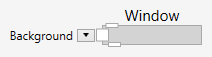
The Window node creates the connection to the nVision workspace area.
If a Window node is available in the pipeline, it takes over the display. This means that the default of displaying the first pipeline output is overridden, and the window along with its children is displayed instead.
At the bottom of the Window node is a pin that allows it to connect one child to the window. This child can take all the space in the window. Usually, this will be a control from the layout group of controls.
Example
Here is an example:

Below the Window node is a GroupBox. Inside the GroupBox is a StackPanel and inside the StackPanel is an ImageDisplay which displays an image and a BarChart which displays the image histogram, stacked in horizontal direction.