MaskedTextBox
The MaskedTextBox is a HMI control that can be used to restrict user input based on a specified regular expression mask.
Inputs
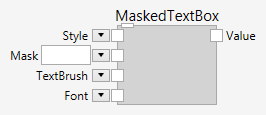
Style (Type: Style)
Optional styling of the MaskedTextBox.
The MaskedTextBox respects the Width, Height, HorizontalAlignment, VerticalAlignment, Margin, Padding and Background, Foreground and Font styles.
Mask (Type: string)
The desired input pattern.
TextBrush (Type: SolidColorBrush)
The text color.
Font (Type: Font)
The font.
Description
The Mask input is used to define the desired pattern that must be input. Any characters that violate the mask will be discarded. This ensures that only data in the proper format is entered.
Regular Expression Maks
The mask is entered in the form of a regular expression, as described below.
Literals
Literal characters can be included in the regular expression, but special characters must be escaped using the backslash character (\).
Character Classes
Character classes can be used to define one or more characters, using ranges or by explicitly defining individual characters. Character classes are enclosed in square brackets. Ranges can be defined using a start character, followed by a dash (-), followed by an end character. For example, the character class "[0-9]", includes all digits. Additional ranges can be appended to specify discontiguous ranges. For example, the character class "[0-37-9]", includes all digits except 4, 5, and 6.
The caret (^) can be used to negate the character class. For example, the character class "[^0-9]" includes all characters except the digits.
Groups
Any number of regular expression elements can grouped together by enclosing them in parenthesis. Alternations, which are described below, are a special type of group which are also enclosed in parenthesis. Groups can be repeated using one of the support quantifiers after the closing paraenthesis.
For example, the regular expression "ABC*" requires A and B, then allows for zero or more of C. The regular expression "(ABC)*", which groups ABC into a single element, allows for zero or more of ABC together.
In terms of literal completion, only the A character would ever be entered by the end-user for the "(ABC)*" regular expresssion. When the user types an A, then the BC are required and are therefore automatically inserted by the control. If an additional A is typed, then again the BC would be auto completed, resulting in "ABCABC" as the text.
Alternation
Alternation allows for two or more alternate branches to be taken and is defined by using the vertical bar in parenthesis. For example, the "(AB|CD)" regular expression can match the string AB or the string CD. The alternate branches can be any other supported regular expression element, including other groups or alternations. This allows for very complex scenarioes to be defined and used as a mask.
When showing prompt indicators for uncompleted sections of the maks, the control will choose the shortest branch of an alternation that would result in completion of the mask.
Quantifier
Quantifiers can be used to specify the number of times a regular expression element should be repeated. There are several methods for defining quantifiers, which are:
| Quantifier | Description |
|---|---|
? |
Indicates that the regular expression element is optional. For example, the regular expression "AB?C" will match the string ABC or AC. |
* |
Indicates that the regular expression element can be repeated zero or more times, with no upper limit. For example, the regular expression "AB*C" will match the string ABC or AC, as well as ABBBBBBBC. |
+ |
Indicates that the regular expression element must occur once, but can be repeat any number of times. For example, the regular expression "AB+C" will match the string ABC or ABBBBBBBC, but will not match AC. |
{N} |
Indicates that the regular expression element must occur exactly N times, where N is a postive integer value. For example, the regular expression "AB{2}C" will only match the string ABBC. |
{N,} |
Indicates that the regular expression element must occur exactly N times, where N is a postive integer value, but can be repeated any number of times. For example, the regular expression "AB{2,}C" will match the string ABBC or ABBBBBBC. |
{N,M} |
Indicates that the regular expression element must occur exactly N times, where N is a postive integer value, but can be repeated M times, where M is a positive integer value greater than N. For example, the regular expression "AB{2,3}C" will match the string ABBC or ABBBC, but not ABBBBC. |
Prompt Indicators
The control will render one or more prompt indicators (a circle) when additional input is required. Literals will also be rendered ahead of the user input, when possible.
Caret
The caret is used to indicate where the next typed character (or pasted text) will be inserted.
The caret is only shown when the control currently has the keyboard focus.
Example
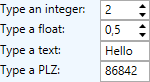
Here is an example that shows the various edit controls. This definition:

creates the following user interface: