SubPipeline
A subpipeline groups several nodes and their connections. This is a means to organize code.
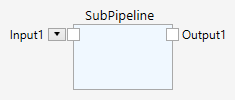
At the outside, a subpipeline appears like a single node, with inputs and outputs. Inside, a subpipeline looks like a normal branched pipeline.

A subpipeline can be nested, that is you can have subpipelines inside other subpipelines.
The nesting of subpipelines is shown with a breadcrumbs control at the top.

Double-click a subpipeline to enter it, and use the breadcrumbs control to exit it and go up one or more levels.
By default, a subpipeline has one input and one output. You can add inputs and outputs with the Add Input (Ctrl-I) and the Add Output (Ctrl-O) commands. You can edit the port names by clicking on them and typing a new name. The type of the ports is determined by the first connection made to them, either from the outside or from the inside.