Display
The Display node is the root of the hierarchical widget system, which is used to display images, regions, palettes, histograms, profiles and graphical items in a layered fashion.
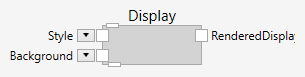
The Display node creates the connection to the nVision workspace area.
If a Display node is available in the pipeline, it takes over the display. This means that the default of displaying the first pipeline output is overridden, and the display along with its children is displayed instead.
If a Window node is also available in the pipeline, it takes precedence over the Display node.
At the bottom of the Display node is a pin that allows it to connect children to the display. The children and grandchildren define the layering of the widgets and the graphical outcome.
Inputs
Style (Type: Style)
Optional styling of the Display.
The Display respects the Width, Height, HorizontalAlignment, VerticalAlignment, Margin and Padding styles.
Background (Type: SolidColorBrushByte)
The background of the Display.
Outputs
RenderedDisplay (Type: Image)
The rendering (with all the children) in the form of an image.
Example
Here is an example that displays an image inside a display:

Below the Window node is a Display and below the Display is an Image.
Note: the Window node on top of the Display node is optional. The Style input is only respected, if the Window node has a Display node parent.