Import Image + Palette
Imports an image and its associated palette from a file.
Comments
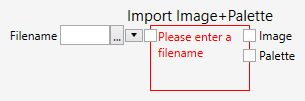
The ImportImage node loads an image and its associated palette from the filesystem. The name of the file can either by typed, or selected with a File Open dialog - by clicking on the  button. The node supports a variety of image file formats, such as TIF, PNG, JPG and BMP to name a few. If a file could not be loaded for some reason, an appropriate error message is shown.
The loaded image is not mapped over the palette, and you may need to do this if you want to make sure that the image is displayed in a visual correct manner.