TCP/IP Server
Creates a TCP/IP Server.
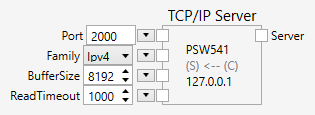
Inputs
Port (Type: String)
The port or service name. Strings such as 21, http, etc. can be used. Possible values for the service name are listed in the file %WINDIR%\system32\drivers\etc\services.
Family (Type: String)
The address family for the connection. Ipv4 or Ipv6 are possible.
BufferSize (Type: String)
The size of the read and write buffers.
ReadTimeout (Type: String)
The timeout of a read operation.
Comments
The TCP/IP Server node creates a server that communicates with a remote TCP/IP client over a network connection.
The remote client can be another PC, a PLC or another device such as a robot.
When a connection has been made, data can be sent or received through the connection. The Write nodes is used to send data, the Read node is used to receive data.
Establishing a connection is a two-step process, which executes asynchronously. First, the server is created and listens for connections. Once a client connects, the TCP/IP Server executes again and completes the connection and updates the connection.
Example
Here is an example that shows how to used the TCP/IP Server node (click on the image to load the example):

The example starts a TCP/IP server which listens for a client connection. The server implements two commands: HELLO and TIME. It polls for the command every 100 ms. If the server receives HELLO, it responds with Hi, nVision talking here!, and if the server receives TIME, it responds with the actual date and time. Anything else is ignored.
You can send the commands with any utility program that allows you to send text strings, such as telnet.