Adam Module
Establish a connection to an Adam-60xx Ethernet Module from Adavantech, which allows you to read and write digital signals.

This node initializes the module. If you connect its output to a GetProperty node, you can gather information about the device. Usually you would connect the output to an Adam600 DigIn node to read electrical input, or an Adam6000 DigOut node to write electrical output.
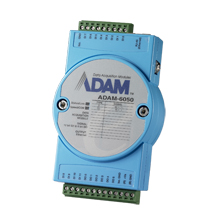
The Adam modules are connected via LAN or wireless LAN to a PC and support a variety of input/output lines. The modules may have additional features, such as counters, etc., but these are not yet supported.
| module | bus | features |
|---|---|---|
| ADAM-6050 | LAN | 12 digital inputs, 6 digital outputs |
| ADAM 6050W | WLAN | 12 digital inputs, 6 digital outputs |
| ADAM-6051 | LAN | 12 digital inputs, 2 digital outputs |
| ADAM-6051W | WLAN | 12 digital inputs, 2 digital outputs |
| ADAM-6052 | LAN | 8 digital inputs, 8 digital outputs |
| ADAM 6060 | LAN | 6 digital inputs, 6 digital outputs |
| ADAM-6060W | WLAN | 6 digital inputs, 6 digital outputs |
| ADAM-6066 | LAN | 6 digital outputs |
