C# Expression
This node interprets simple C# statements. Statements are written using a subset of C# language specifications. The expression can be edited as long as no connections have been made to the inputs and outputs.
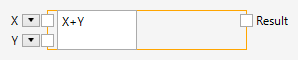
Inputs
The number and names of the inputs are determined when the expression has been specified. They are determined by parsing the expression.
Outputs
The output type is determined when the expression has been specified. It is determined by parsing the expression.
Comments
The expression parser is case sensitive.
Statements can be written using a subset of the C# syntax. Here you can find a list of the supported expressions:
Operators
Category | Operators |
|---|---|
Primary | x.y f(x) a[x] |
Unary |
|
Multiplicative | * / % |
Additive | |
Relational and type testing | < > <= >= is as |
Equality | == != |
Conditional AND | && |
Conditional OR | || |
Conditional | ?: |
The assignment operator is not available.
Operators precedence is respected following C# rules (Operator precedence and associativity).
Types
From an expression alone, the types cannot be deduced reliably. For example, the following expression
x + y
could add two numbers together, or concatenate two strings. Thus, additional syntax allows you to specify the type of the parameters of an expression. The expression
((int))x + ((int))y
ties the two parameters to the int type. If a type specification is missing, the parameter will be of type double by default.
The C# built in types can be used in their short or expanded form:
Short | Expanded |
|---|---|
bool | System.Boolean |
byte | System.Byte |
sbyte | System.SByte |
char | System.Char |
decimal | System.Decimal |
double | System.Double |
float | System.Single |
int | System.Int32 |
uint | System.UInt32 |
long | System.Int64 |
ulong | System.UInt64 |
object | System.Object |
short | System.Int16 |
ushort | System.UInt16 |
string | System.String |
In addition, any types available inside nVision can be used, such as in the following expression:
((Ngi.Image))img.Width
Literals
Category | Operators |
|---|---|
Constants | true false null |
Numeric | f m |
String/char | “” ‘’ |
The following character escape sequences are supported inside string or char literals:
\'- single quote, needed for character literals\"- double quote, needed for string literals\\- backslash\0- Unicode character 0\a- Alert (character 7)\b- Backspace (character 8)\f- Form feed (character 12)\n- New line (character 10)\r- Carriage return (character 13)\t- Horizontal tab (character 9)\v- Vertical quote (character 11)
License
The C# Expression node uses the Dynamic Expresso library from Davide Icardi.
[MIT License]
Copyright (c) 2015 Davide Icardi
Permission is hereby granted, free of charge, to any person obtaining a copy of this software and associated documentation files (the “Software”), to deal in the Software without restriction, including without limitation the rights to use, copy, modify, merge, publish, distribute, sublicense, and/or sell copies of the Software, and to permit persons to whom the Software is furnished to do so, subject to the following conditions:
- The above copyright notice and this permission notice shall be included in all copies or substantial portions of the Software.
- THE SOFTWARE IS PROVIDED “AS IS”, WITHOUT WARRANTY OF ANY KIND, EXPRESS OR IMPLIED, INCLUDING BUT NOT LIMITED TO THE WARRANTIES OF MERCHANTABILITY, FITNESS FOR A PARTICULAR PURPOSE AND NONINFRINGEMENT. IN NO EVENT SHALL THE AUTHORS OR COPYRIGHT HOLDERS BE LIABLE FOR ANY CLAIM, DAMAGES OR OTHER LIABILITY, WHETHER IN AN ACTION OF CONTRACT, TORT OR OTHERWISE, ARISING FROM, OUT OF OR IN CONNECTION WITH THE SOFTWARE OR THE USE OR OTHER DEALINGS IN THE SOFTWARE.