Export Image (Immediate)
Exports an image to a file.
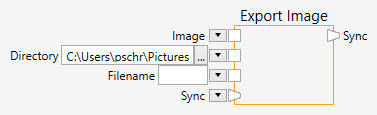
Inputs
Image (Type: Image)
An image.
Directory (Type: String)
A directory in the filesystem. This is the directory, where the saved files will be placed. If the directory does not exist, an error message will be shown.
Filename (Type: String)
A filename. You can either enter a filename (with extension) or leave this empty. If you leave it empty, the system will create a name in the form of “image_00000.tif”, where the number will be incremented automatically. If you enter a filename, the file will be overwritten in every execution of the pipeline node.
Comments
The Export Image node saves an image to the filesystem. The directory where the file will be saved can either by typed, or selected with a Search Folder dialog - by clicking on the  button. The node supports a variety of image file formats, such as TIF, PNG, JPG and BMP to name a few. If a file could not be saved for some reason, an appropriate error message is shown.
Sample
Here is an example that shows how to used the Export Image node (click on the image to load the example):
