Graphic Programming Language
Pipelines
Pipelines are the programs that nVision executes. Data flows through a pipeline.
Nodes are the building blocks of a pipeline. Nodes have Pins, which are used to connect nodes via Connections.
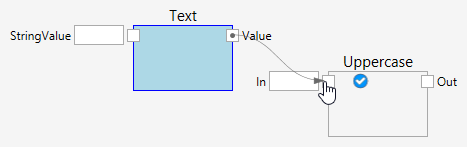
Here is a simple pipeline consisting of two nodes:
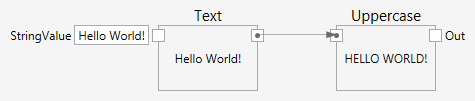
A pipeline builds a directed graph. Data flows in the direction that is visualized with the arrows of the connections. Cycles in the graph are forbidden.
In the above example, the Text node has a StringValue Input Pin, where the text Hello World! was typed. The Output Pin of the node was connected to the Input Pin of the Uppercase node. Each node displays the value of its (first) Output Pin.
Pipelines are executed in a live fashion. At any time any value changes, the pipeline re-runs and produces new outputs. Pipeline execution is demand driven and lazy. Nodes execute only if and when needed.
Nodes
Nodes are the building blocks in a pipeline.
A node may have Input Pins and/or Output Pins. The Pins are used to connect Nodes with Connections.
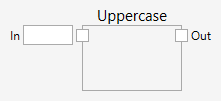
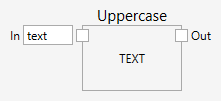
This is a Node with one Input Pin labelled In and one Output Pin labelled Out. It takes its input text and uppercases each letter and provides the result on its output.
Pins
Nodes may have Input Pins and/or Output Pins. Pins are typed.

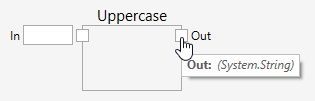
Connections can be made only between Pins with compatible Types.
Pins are compatible, if their Types are equal or if the Type flowing on the connection can be converted automatically.
Pins with incompatible Types cannot be connected.

Subpipelines
Subpipelines can be used to group a set of connected Nodes into one Node.
As any other Node, a Subpipeline has Input Pins and/or Output Pins.
By default, a Subpipeline Node has one Input Pin and one Output Pin.
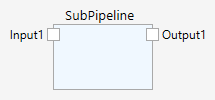
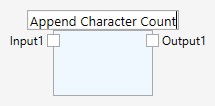
The name of the Subpipeline can be edited by clicking it:
Inside the Subpipeline (double-click the Node to get inside) it looks like this:

Additional Pins of a Subpipeline Node can be defined with the Add Input Pin and Add Output Pin commands on the context menu. The name of the Pin can be edited by clicking on it. A Pin can also be removed with the Delete Pin command (right click somewhere on the Pin definition - but not on the text).
The Type of a Subpipeline Pin is undefined as long as it is not connected. As soon as the Pin is connected (either from the inside, or from the outside) its Type is set (determined by the Type of the Pin on the other end of the connection).
Transform
The Transform Node takes a list of items and transforms it into a list of other items.
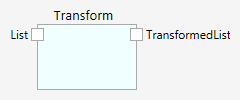
Transform goes through the input list item by item, and transforms each into a new item. New items are then combined into the output list.
At the outside, transform takes the appearance of a Subpipeline. As any other Node, Transform has Input Pins and/or Output Pins.
By default, the transform Node has one Input Pin and one Output Pin.
The name of the Transform Node can be edited by clicking it:
Inside the Transform (double-click the Node to get inside) it looks like this:
At the inside, Transform takes the appearance of a Subpipeline, but with predefined Input pins Item and ItemIndex. These predefine Pins carry one item of the input list and its index in the input list, respectively.
Additional Pins of a Transform Node can be defined with the Add Input Pin and Add Output Pin commands on the context menu. The name of the Pin can be edited by clicking on it. A Pin can also be removed with the Delete Pin command (right click somewhere on the Pin definition - but not on the text).
The Type of a Transform Pin is undefined as long as it is not connected. As soon as the Pin is connected (either from the inside, or from the outside) its Type is set (determined by the Type of the Pin on the other end of the connection).
Types
Data flowing in pipelines is typed.
Primitive Types are:
| type | type-name | description |
|---|---|---|
| boolean | System.Boolean |
|
| integer (32 bit, signed) | System.Int32 |
|
| text | System.String |
textual data, such as Text. |
Input Pins and Output Pins are typed. With most pins this type is fixed, but on some pins the type may change while the pipeline is edited.
Pins that may change are the input and output pins of subpipelines and their list processing cousins. These pins take over a specific type from the first connection that is made to them, either from the outside or from the inside.
Conversions
Connections between two Pins provide the means for data to flow. Since the Pins define the Type of data, connections can only be made, if the Types at both ends of the connection are the same, or if the data can be converted.
Widening conversions are made automatically, if they are available. Behind the scenes, a conversion Node is created, but this conversion Node is hidden.
Converting an integer number to a floating point number is widening (any integer number can be represented as a floating point number as well) and will be made automatically.
Converting a floating point number to an integer number is narrowing (the fractional part of a floating point number needs to be cut away to convert) and is not made automatically.