Point
The Point node is used to display a point.
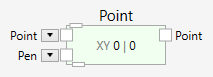
At the top of the Point node is a pin that allows it to connect to a parent widget. The point will be displayed only, if a parent connection is made.
At the bottom of the Point node is a pin that allows it to connect children to the point widget. The parent, grandparent, children and grandchildren define the layering of the widgets and the graphical outcome.
Children are layered on top of the parent.
Inputs
Point (Type: Point)
The position of the point. If this pin is connected, the incoming position is used and the point is fixed at this position. If this pin is left open (not connected), at the beginning the default position of (0, 0) is used and the point can be dragged around by pointing at it with the mouse, selecting it with a press of the left mouse button, and moving the mouse while holding down the left mouse button.
Pen (Type: Pen)
The pen used to draw the point.
Example
Here is an example that shows how a Point widget is used as an anchor to position children.
