HMI Canvas
The Canvas allows you to put controls at specific positions on the canvas.
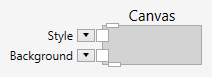
At the bottom of the Canvas node is a pin that allows it to connect several children.
Inputs
Style (Type: Style)
Optional styling of the Canvas.
The Canvas respects the Width, Height, HorizontalAlignment, VerticalAlignment, Margin, Padding and Background styles.
Background (Type: SolidColorBrushByte)
The background of the Canvas.
Comments
Children of the Canvas have the attached properties Left and Top. These properties are pixel positions and define where exactly the respective child will be put on the canvas.
Example
Here is an example that puts four images on a canvas. This definition:

creates the following user interface: