TCP/IP Client
Creates a TCP/IP Client.
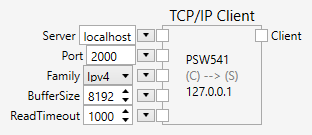
Inputs
Server (Type: String)
The server name that should be connected. Strings such as www.impuls-imaging.com, 81.169.145.169, localhost, 127.0.0.1, etc., can be used.
Port (Type: String)
The port or service name. Strings such as 21, http, etc. can be used. Possible values for the service name are listed in the file %WINDIR%\system32\drivers\etc\services.
Family (Type: String)
The address family for the connection. Ipv4 or Ipv6 are possible.
BufferSize (Type: String)
The size of the read and write buffers.
ReadTimeout (Type: String)
The timeout of a read operation.
Outputs
Client (Type: TcpipClient)
The TCP/IP client. You can use the PeerName property to check if the client is connected to a server.
Comments
The TCP/IP Client node creates a client that communicates with a remote TCP/IP server over a network connection.
The remote server can be another PC, a PLC or another device such as a robot.
When a connection has been made, data can be sent or received through the connection. The Write nodes is used to send data, the Read node is used to receive data.
Example
Here is an example that shows how to used the TCP/IP Client node (click on the image to load the example):

The example sends a GET command to www.impuls-imaging.com and retrieves the contents of the file hello.txt.