Context Menu
The context menu can be opened from the pipeline editor by clicking the right mouse button.
It shows commands to enter nodes and add additional input or output ports.

You can browse through the menu, and selecting an item will usually place the respective node in the pipeline editor canvas, at the position where the mouse was when the menu opened.
The only exceptions to this rule are the following entries:
| entry | description |
|---|---|
| Add Input (Ctrl-I) | add an input port |
| Add Output (Ctrl-O) | add an output port |
| Copy (Ctrl-C) | copy the selected nodes |
| Paste (Ctrl-V) | paste the selected nodes |
The search box at the top of the menu allows you to narrow down the menu. For example, if you are looking for commands that have something to do with histogram, start typing his, and the context menu will show only those commands and groups that have something to do with histograms.
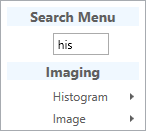
Note that you do not need to click into the search edit box at the top of the menu, you can just start typing.