AppendToTextFile
Appends an line of text to a text file.
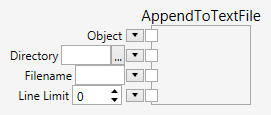
Inputs
Object (Type: Object)
The input element. The input element is converted to a text which is then appended as a line to the existing contents of the file.
Directory (Type: String)
A directory. This is preset with the user’s documents folder.
Filename (Type: String)
A filename. This is preset with "data.txt".
LineLimit (Type: Int32)
The maximum number of lines the file is limited to. Teh default is 0 which means that there is no limit. Negative values will be treated the same as 0.
Comments
The AppendToTextFile node appends a line of text to a file. The input element can be any object, which is converted to a line of text.
The directory and filename of the file can be specified. If no directory is used, the node uses the user’s documents folder. If no filename is used, the node uses the name "data.txt". If the directory does not exist, it will be created.
The maximum number of lines that the file should have after the append can be specified. If the maximum number of lines would be execeeded, the system still appends a line to the file, but at the same time it also removes the line at the beginning of the file.
The node only executes, if the Export On/Off mode has been turned on,

or if the Export Once button is clicked.

Otherwise, the node does not execute and has no effect.