ExportPalette
Exports a palette to a file.
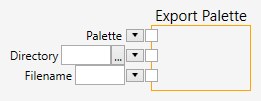
Inputs
Palette (Type: Palette)
A palette.
Directory (Type: String)
A directory in the filesystem. This is the directory, where the saved files will be placed. If the directory does not exist, an error message will be shown.
Filename (Type: String)
A filename. The file will be overwritten in every execution of the pipeline node.
Comments
The ExportImage node saves a palette to the filesystem. The directory where the file will be saved can either by typed, or selected with a Sewarch Folder dialog - by clicking on the  button.
The supported format is a binary file consisting of either 256 bytes (for a monochrome palette) or 768 bytes (for a color palette).
The ExportImage node saves palettes only in two cases:
- The export mode is on (the Export on/off button is pressed).
 If the Export on/off button is pressed, any time the pipeline runs the file will be saved.
 - The Export once button will be clicked.
 If the Export once button is clicked, the file will be saved.