CircularGradient
Presets an image with a circular gradient pattern.
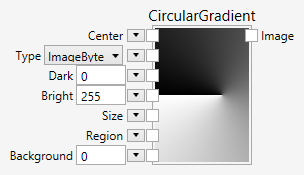
Inputs
Center (Type: PointDouble)
The center of the gradient. The default is 512, 512.
Type (Type: String)
The image type. The following types can be chosen: ImageByte, ImageUInt16, ImageUInt32, ImageDouble, ImageRgbByte, ImageRgbUInt16, ImageRgbUInt32, ImageRgbDouble
Dark (Type: String)
The dark value. This value is converted into the appropriate pixel type, depending on the Type parameter. For monochrome images you should enter one number, for rgb color images you should enter three numbers separated by a space.
Bright (Type: String)
The bright value. This value is converted into the appropriate pixel type, depending on the Type parameter. For monochrome images you should enter one number, for rgb color images you should enter three numbers separated by a space.
Size (Type: Extent3d)
The size of the image that is created. The default value is 1024 x 1024 x 1 pixels.
Region (Type: Region)
An optional region that constrains the preset operation to inside the region only. Pixels outside the region are colored with the Background color.
Background (Type: String)
The preset value outside of the region. This value is converted into the appropriate pixel type, depending on the Type parameter. For monochrome images you should enter one number, for rgb color images you should enter three numbers separated by a space.
Comments
The CircularGradient node presets an image with a circular gradient pattern. The size of the created image, the colors for dark and bright checkerboard fields, the region of interest and the background color can all be specified.
Sample
Here is an example that shows how to used the CircularGradient node.

Here is the image created with the sample:
