Identification
Barcode Decoding
nVision supports decoding barcodes.
Several one-dimensional symbologies are supported. Here is an alphabetical list of the supported symbologies:
| Symbology | Dimensionality | Link to Description |
|---|---|---|
| Code39 | 1D | http://en.wikipedia.org/wiki/Code_39 |
| Code93 | 1D | http://en.wikipedia.org/wiki/Code_93 |
| Code128 | 1D | http://en.wikipedia.org/wiki/Code_128 |
| EAN | 1D | http://en.wikipedia.org/wiki/International_Article_Number_(EAN) |
| UPC | 1D | http://en.wikipedia.org/wiki/Universal_Product_Code |
The decoder node has a selection list, where you can select the symbologies that you want to decode.
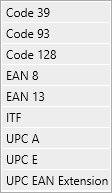
The symbology selection list.
The decoder expects one code in the image that is given. It expects the code to sit roughly in the middle and the scanning is horizontal. This means that the bars should be vertical. A virtual horizontal scan line that sits in the middle should cross the whole code.
Here is an example of a perfectly positioned code:

Perfect position of code for the decoder.
The code in the following image cannot be decoded:

The decoder cannot decode this image, because the bars are horizontal.
The code in the following image does not decode, because the virtual scan line does not cross the whole code:

The decoder cannot decode this image, because the virtual scan line does not cross the whole code.
The barcode decoder does not do anything else to locate a barcode. If your circumstances are different, you can use other preprocessing tools, to bring the barcode in a suitable position for the decoder. If the barcode is not properly rotated, you can use the rotation tools. If the barcode is not properly located, you can use the crop tool to cut out the relevant portion for the barcode decoder. If contrast or brightness are not sufficient, you can use image preprocessing.
The decoder can be inserted in the linear pipeline or in a sub-pipeline.

In a linear pipeline, the image flows in from the top and the symbologies can be selected.
In a sub-pipeline, there is an additional region input as well as a boolean input, that tries more location steps at the expense of longer decoding time.
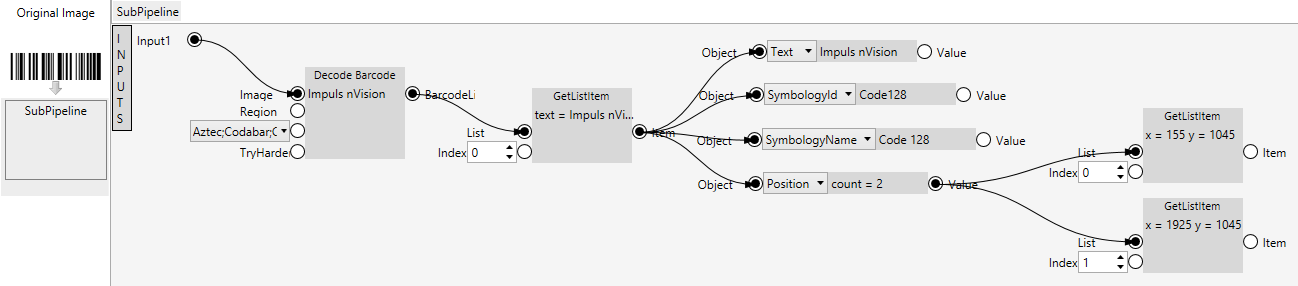
In a sub-pipeline, more control can be executed.
In addition, also the output of the decoder can be handled in more detail. The decoder delivers a list of results, and each result contains the decoded string, the name and identifier of the recognized symbology and the position where the code was found.
Matrixcode Decoding
nVision supports decoding matrix codes.
Several two-dimensional symbologies are supported. Here is an alphabetical list of the supported symbologies:
| Symbology | Dimensionality | Link to Description |
|---|---|---|
| Aztec | 2D | http://en.wikipedia.org/wiki/Aztec_Code |
| Data Matrix | 2D | http://en.wikipedia.org/wiki/Data_Matrix |
| PDF417 | 2D | http://en.wikipedia.org/wiki/PDF417 |
| QR Code | 2D | http://en.wikipedia.org/wiki/QR_code |
The decoder node has a selection list, where you can select the symbologies that you want to decode.

The symbology selection list of the matrixcode decoder.
The decoder expects one code in the image that is given. It expects the code to sit roughly in the middle.
Here is an example of a perfectly positioned code:

Perfect position of code for the decoder.
The matrix code decoder does not do anything else to locate a code. If your circumstances are different, you can use other preprocessing tools, to bring the matrix code in a suitable position for the decoder. If the matrix code is not properly located, you can use the crop tool to cut out the relevant portion for the matrix code decoder. If contrast or brightness are not sufficient, you can use image preprocessing.
The decoder can be inserted in a sub-pipeline.